Mastodon
Cross-posting
Description
Movary can post each movie play or watchlist addition to a Mastodon account via the Post a new status Mastodon API.
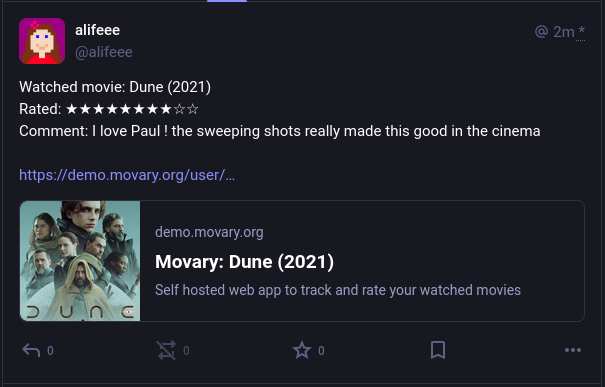
The Mastodon Post for a new (or changed) movie play contains:
- Movie Title and Year
- Movie user rating (OPTIONAL: Only if user rating exists)
- Movie user play comment (OPTIONAL: Only if user comment exists)
- Movary URL of the movie
Instruction
Warning
Do not share the API key with anyone or they will be able to post statuses to your Mastodon account
- Enable Mastodon integration via the settings page on Movary (
/settings/integrations/mastodon) - Set your username (e.g. @username@mastodon.social) and Access Token (needs
write:statusesaccess) - Optional: Make sure to adjust your Mastodon Post visibility if necessary
- Save your settings
- Optional: Use the
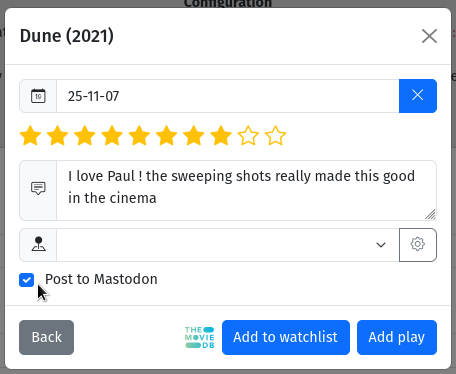
Testbutton to create a test Mastodon post to verify your saved settings - You can now see a "Post to Mastodon" checkbox when you add a movie
CLI Commands
# Post play addition to mastodon
php bin/console.php mastodon:post:play --userId=1 --movieId=1 --watchDate=today

# Post watchlist addition to mastodon
php bin/console.php mastodon:post:watchlist --userId=1 --movieId=1